Your Documents Deserve a Vault, Not a Cloud.
153 AI-powered tools for document processing, search, and compliance -- running 100% on your hardware. Zero cloud. Zero data exposure. One install command.
$ npx -y ocr-provenance-mcp install No cloud APIs. No data exposure. Your GPU, your container, your data.
HIPAA, SOC 2, SOX compliance exports built in. Not bolted on.
One install. Works with Claude Code, Cursor, and Windsurf automatically.
After You Install
Just Tell Your AI: "Open the OCR Dashboard"
Once installed, your AI client already has all 153 tools loaded. Simply ask it to open the dashboard and it will launch the full web UI on localhost:3367 -- no extra setup needed.
Step 1: Install
npx -y ocr-provenance-mcp install Step 2: Ask Your AI
"Open the OCR dashboard"
Your AI opens the dashboard with document stats, search, compliance reports, and account management.
See dashboard preview1,150 docs
Processed in ~3 min
153
MCP Tools
30-75x
More tools than competitors
100%
Local Processing
$0.03
Per File
Your AI Tools Are Leaking Your Documents to the Cloud.
- Your team sends confidential documents to cloud AI tools -- and you can't prove where the data goes
- Your compliance audit asks for document processing provenance -- and you have nothing to show
- You need AI-powered search across 10,000 contracts -- but your legal team won't approve cloud processing
- Your HIPAA officer just asked how patient records are handled by your AI tools
- Every OCR vendor wants you to upload documents to THEIR servers
"Every document you send to a cloud API is a compliance risk you can't take back. And your auditor is going to ask about it."
One Install. Zero Cloud. Complete Document Intelligence.
Before
Send documents to cloud APIs and hope for the best
'Where did this data come from?' -- no answer
Manual HIPAA compliance documentation
Pay $0.07 per page to cloud OCR
Hire a consultant to build document search ($50K+)
'We need 6 months to build this internally'
After
100% local processing -- documents never leave your machine
SHA-256 provenance chains with one-click W3C PROV export
Automated compliance reports in seconds -- HIPAA, SOC 2, SOX
$0.03 per file -- a 100-page contract costs three cents
153 tools installed in 60 seconds -- semantic search, contract analysis, approval workflows
Processing documents in under 5 minutes after install
Send documents to cloud APIs and hope for the best
100% local processing -- documents never leave your machine
'Where did this data come from?' -- no answer
SHA-256 provenance chains with one-click W3C PROV export
Manual HIPAA compliance documentation
Automated compliance reports in seconds -- HIPAA, SOC 2, SOX
Pay $0.07 per page to cloud OCR
$0.03 per file -- a 100-page contract costs three cents
Hire a consultant to build document search ($50K+)
153 tools installed in 60 seconds -- semantic search, contract analysis, approval workflows
'We need 6 months to build this internally'
Processing documents in under 5 minutes after install
$ npx -y ocr-provenance-mcp install See Exactly What It Does
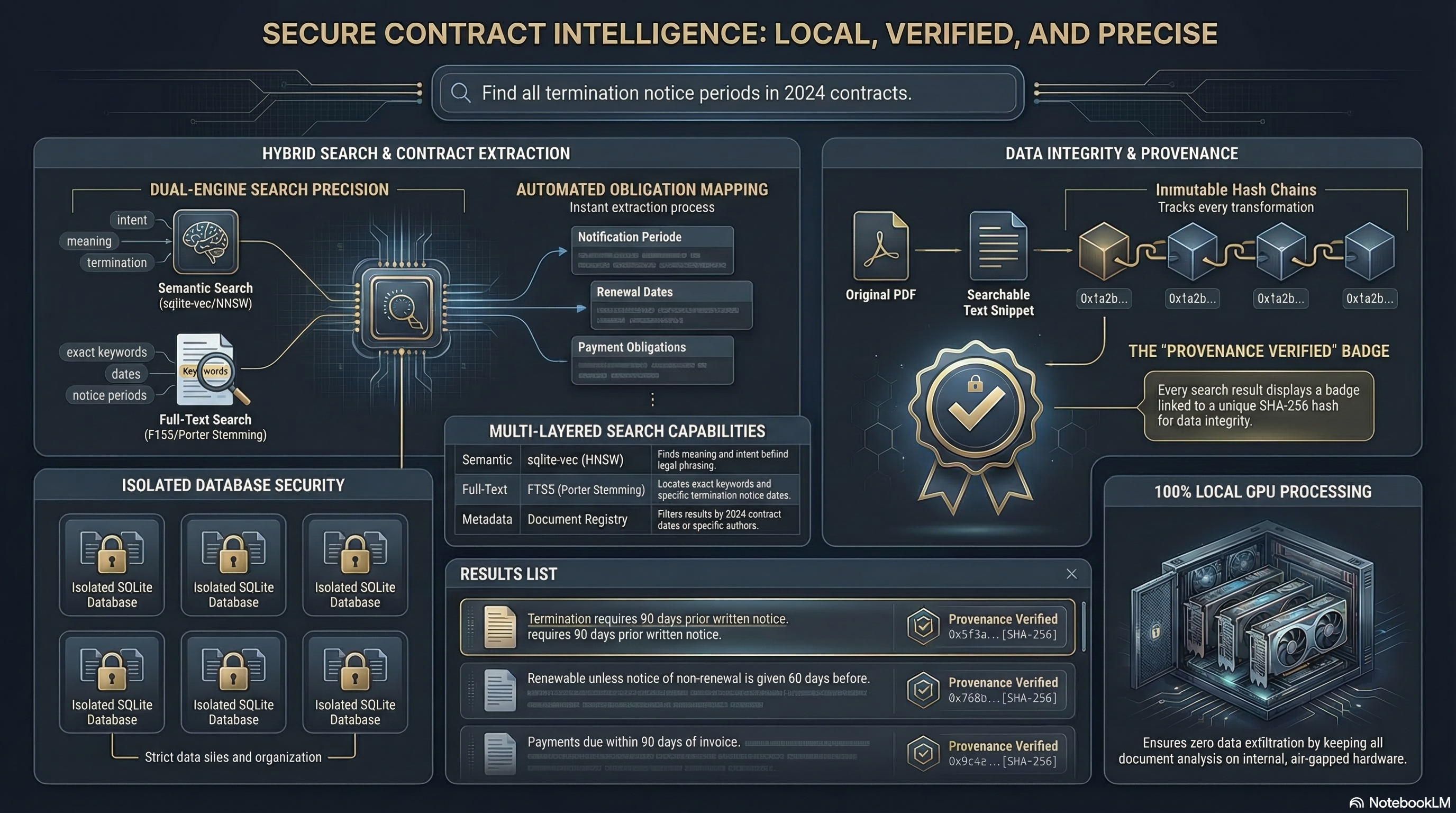
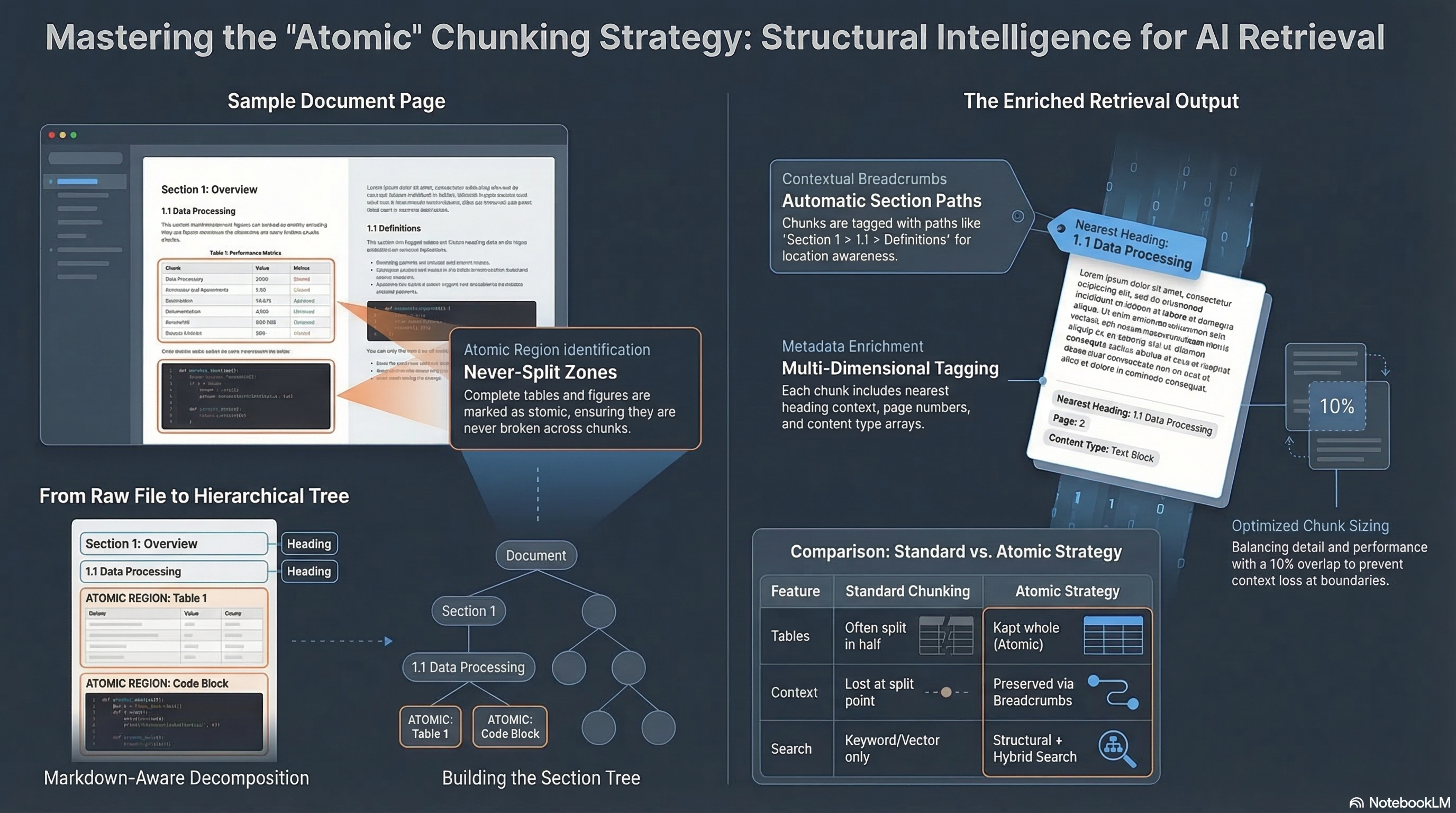
Included: Business Strategy Knowledge Base -- Every install ships with a fully searchable database of 1,147 Alex Hormozi YouTube video transcripts plus all 3 of his books ($100M Offers, $100M Leads, $100M Money Models). That's 2.6+ million tokens of business strategy context -- more than fits in any context window. Point your AI at this database and ask anything about pricing, offers, lead generation, or growth strategy. Ready to search the moment you install. No credits needed.
~2-5 sec/page
OCR Speed
~12ms/chunk
Embedding
<100ms
Semantic Search
<200ms
Hybrid Search
~3 min
Full Pipeline (1,150 docs)
$ npx -y ocr-provenance-mcp install Built for the Industries That Can't Afford a Data Breach
Healthcare
HIPAA compliance built in. Patient records processed on your hardware. Automated compliance reports. 6+ year audit trails.
Learn moreLegal
Attorney-client privilege protected by architecture. Contract analysis, obligation tracking, and playbook comparison -- without exposing a single clause to the cloud.
Learn moreFinancial Services
SOC 2 and SOX compliance exports. HMAC-signed billing. SHA-256 provenance chains. The audit trail your regulator wants to see.
Learn more154 Tools Across 18 Categories. All Included.
Every tool listed below installs with a single command. Click any category to explore.
Document Ingestion
7Ingest files, directories. Process, retry, reprocess.
- ▸
ocr_ingest_filesIngest specific files
- ▸
ocr_ingest_directoryBulk ingest entire directory
- ▸
ocr_process_pendingRun full OCR pipeline on pending documents
- ▸
ocr_convert_rawQuick OCR preview without creating records
- ▸
ocr_reprocessRe-run OCR with different settings
- ▸
ocr_retry_failedReset failed documents to pending
- ▸
ocr_statusCheck processing status
Search
7Keyword, semantic, hybrid. Cross-database. RAG context.
- ▸
ocr_searchUnified search — keyword, semantic, or hybrid
- ▸
ocr_search_cross_dbSearch across multiple databases
- ▸
ocr_rag_contextAssemble search context for RAG
- ▸
ocr_benchmark_compareCompare search quality across databases
- ▸
ocr_fts_manageFTS5 index maintenance (rebuild/status)
- ▸
ocr_search_exportExport search results to CSV/JSON
- ▸
ocr_search_savedManage saved searches (save/list/execute)
Document Management
10List, view, delete, deduplicate, version history, structure.
- ▸
ocr_document_getGet full document details
- ▸
ocr_document_listBrowse documents with cursor pagination
- ▸
ocr_document_deletePermanently delete document
- ▸
ocr_document_find_similarFind similar documents by embedding
- ▸
ocr_document_duplicatesFind duplicate documents
- ▸
ocr_document_structureGet document outline/tree structure
- ▸
ocr_document_update_metadataUpdate title/author/subject
- ▸
ocr_document_versionsFind all versions of re-ingested document
- ▸
ocr_document_workflowTrack document review states
- ▸
ocr_exportExport document as JSON/markdown/CSV
Provenance Tracking
6Full chain-of-custody. SHA-256. W3C PROV export.
- ▸
ocr_provenance_getGet provenance chain with descendants
- ▸
ocr_provenance_queryQuery provenance with filters
- ▸
ocr_provenance_timelineProcessing timeline for document
- ▸
ocr_provenance_verifyVerify data integrity via hash chains
- ▸
ocr_provenance_exportExport provenance (JSON/W3C-PROV/CSV)
- ▸
ocr_provenance_processor_statsPer-processor performance stats
Vision AI (VLM)
3Describe images, charts, diagrams — local Chandra VLM.
- ▸
ocr_vlm_describeGenerate AI description of image (Chandra VLM)
- ▸
ocr_vlm_processRun VLM analysis on all document images
- ▸
ocr_vlm_statusCheck VLM processing status
Image Processing
9Extract, search, reanalyze, stats.
- ▸
ocr_extract_imagesExtract images from PDF/DOCX files
- ▸
ocr_image_getGet full image details
- ▸
ocr_image_listList images with VLM status
- ▸
ocr_image_searchSearch images by keyword or semantic similarity
- ▸
ocr_image_pendingList images needing VLM processing
- ▸
ocr_image_reanalyzeRe-run VLM with custom prompt
- ▸
ocr_image_reset_failedReset failed VLM images to pending
- ▸
ocr_image_deleteDelete images permanently
- ▸
ocr_image_statsGet image processing statistics
Embeddings
4768-dim vectors with nomic-embed-text-v1.5.
- ▸
ocr_embedding_getGet specific embedding details
- ▸
ocr_embedding_listList embeddings with filtering
- ▸
ocr_embedding_rebuildRebuild embeddings for chunk/image/document
- ▸
ocr_embedding_statsGet embedding coverage statistics
Document Comparison
6Side-by-side diff. Batch compare. Similarity matrix.
- ▸
ocr_document_compareDiff two documents (text + structural)
- ▸
ocr_comparison_getRetrieve full diff data
- ▸
ocr_comparison_listList past comparisons
- ▸
ocr_comparison_batchCompare multiple document pairs
- ▸
ocr_comparison_discoverFind likely-similar document pairs
- ▸
ocr_comparison_matrixNxN pairwise cosine similarity matrix
Clustering
7Auto-cluster by similarity. No parameter tuning needed.
- ▸
ocr_cluster_documentsGroup documents by similarity (HDBSCAN/k-means)
- ▸
ocr_cluster_listBrowse existing clusters
- ▸
ocr_cluster_getInspect cluster details
- ▸
ocr_cluster_assignAuto-classify document into existing cluster
- ▸
ocr_cluster_mergeMerge two clusters
- ▸
ocr_cluster_reassignMove document to different cluster
- ▸
ocr_cluster_deleteDelete all clusters for a run
Contract Lifecycle
9Clauses, obligations, calendar, playbooks, summaries.
- ▸
ocr_contract_extractExtract contract-specific information
- ▸
ocr_document_summarizeGenerate structured summary from chunks
- ▸
ocr_corpus_summarizeSummarize entire corpus
- ▸
ocr_obligation_listList contract obligations with filters
- ▸
ocr_obligation_updateUpdate obligation status
- ▸
ocr_obligation_calendarCalendar view of deadlines
- ▸
ocr_playbook_createCreate playbook with preferred terms
- ▸
ocr_playbook_listList all playbooks
- ▸
ocr_playbook_compareCompare document against playbook
Compliance & Audit
5SOC 2, HIPAA, SOX. Full audit trail.
- ▸
ocr_compliance_reportGenerate compliance overview
- ▸
ocr_compliance_hipaaHIPAA-specific compliance report
- ▸
ocr_compliance_exportExport audit trail (SOC 2/HIPAA/SOX format)
- ▸
ocr_user_infoGet/create user with roles
- ▸
ocr_audit_queryQuery audit log with filters
Collaboration
11Annotations, locking, alerts, review workflows.
- ▸
ocr_annotation_createCreate annotation (comment/correction/flag/approval)
- ▸
ocr_annotation_getGet annotation with threaded replies
- ▸
ocr_annotation_listList annotations with filters
- ▸
ocr_annotation_updateEdit annotation or change status
- ▸
ocr_annotation_deleteDelete annotation and replies
- ▸
ocr_annotation_summaryGet annotation statistics
- ▸
ocr_document_lockAcquire exclusive/shared lock
- ▸
ocr_document_lock_statusCheck lock status
- ▸
ocr_document_unlockRelease document lock
- ▸
ocr_search_alert_checkCheck for new docs matching saved search
- ▸
ocr_search_alert_enableEnable/disable search alerts
Workflow & Approvals
8Multi-step chains. Assignment. Queue management.
- ▸
ocr_workflow_submitSubmit document for review
- ▸
ocr_workflow_assignAssign reviewer
- ▸
ocr_workflow_reviewReview (approve/reject/changes requested)
- ▸
ocr_workflow_statusGet workflow state and history
- ▸
ocr_workflow_queueList documents in workflow queue
- ▸
ocr_approval_chain_createCreate reusable approval chain
- ▸
ocr_approval_chain_applyApply approval chain to document
- ▸
ocr_approval_step_decideDecide on approval step
Database Management
20Multi-DB. Backup, restore, clone, merge, snapshot, share.
- ▸
ocr_db_createCreate new SQLite database
- ▸
ocr_db_deletePermanently delete database
- ▸
ocr_db_listList all databases with pagination
- ▸
ocr_db_selectSwitch active database
- ▸
ocr_db_statsGet database statistics (size, counts, quality)
- ▸
ocr_db_archiveArchive database (hide from default list)
- ▸
ocr_db_recentShow recently accessed databases
- ▸
ocr_db_renameRename database
- ▸
ocr_db_searchFind databases by name/description/tags
- ▸
ocr_db_summaryAI-readable database profile
- ▸
ocr_db_tagAdd/remove/set tags and metadata
- ▸
ocr_db_unarchiveRestore archived database
- ▸
ocr_db_workspaceCreate/list/manage database workspaces
- ▸
ocr_db_backupCreate atomic backup (VACUUM INTO)
- ▸
ocr_db_cloneClone database to new name
- ▸
ocr_db_importImport documents from JSON export
- ▸
ocr_db_mergeMerge source database into current
- ▸
ocr_db_restoreRestore database from backup
- ▸
ocr_db_snapshotCreate/list/restore/delete snapshots
- ▸
ocr_export_streamStream export as JSON-Lines
Tags & Organization
6Create, apply, search tags across everything.
- ▸
ocr_tag_createCreate reusable tag with color
- ▸
ocr_tag_listList tags with usage counts
- ▸
ocr_tag_applyAttach tag to any entity
- ▸
ocr_tag_removeDetach tag from entity
- ▸
ocr_tag_searchFind entities by tag
- ▸
ocr_tag_deleteDelete tag permanently
Reports & Analytics
8Quality, cost, performance, error, trend analysis.
- ▸
ocr_report_overviewQuality and corpus overview
- ▸
ocr_report_performancePipeline performance analytics
- ▸
ocr_document_reportDetailed report for single document
- ▸
ocr_cost_summaryCost analytics by document/mode/month
- ▸
ocr_error_analyticsError and recovery analytics
- ▸
ocr_evaluation_reportComprehensive evaluation report
- ▸
ocr_trendsTime-series trends (quality/volume)
- ▸
ocr_export_audit_logExport audit log as CSV/JSON
Intelligence
5Interactive guide. Table extraction. Smart recommendations.
- ▸
ocr_guideSystem state overview with prioritized next steps
- ▸
ocr_document_extrasSupplementary data (charts, links, tracked changes)
- ▸
ocr_document_tablesExtract table data from document
- ▸
ocr_table_exportExport table data as CSV/JSON/markdown
- ▸
ocr_document_recommendRelated document recommendations
System
33Health, config, maintenance, license, dashboard, webhooks.
- ▸
ocr_health_checkDiagnose data integrity issues
- ▸
ocr_db_maintenanceDatabase maintenance (analyze/vacuum)
- ▸
ocr_config_getView system configuration
- ▸
ocr_config_setChange configuration setting
- ▸
ocr_license_statusCheck license status and balance
- ▸
ocr_dashboard_openOpen dashboard in browser
- ▸
ocr_dashboard_statusCheck health of all 3 services
- ▸
ocr_webhook_createRegister webhook for event notifications
- ▸
ocr_webhook_listList registered webhooks
- ▸
ocr_webhook_deleteRemove webhook registration
- ▸
ocr_chunk_getInspect specific chunk by ID
- ▸
ocr_chunk_listBrowse all chunks in document
- ▸
ocr_chunk_contextExpand result with surrounding text
- ▸
ocr_document_pageRead specific page of document
- ▸
ocr_db_shareExport database to shared folder
- ▸
ocr_db_import_sharedImport from shared folder
- ▸
ocr_db_transferPackage database for transfer
- ▸
ocr_db_receiveImport transfer bundle
- ▸
ocr_extraction_getGet extraction results by ID
- ▸
ocr_extraction_listList structured extractions
- ▸
ocr_export_annotationsExport annotations as CSV/JSON
- ▸
ocr_export_obligations_csvExport obligations as CSV
"Other document tools give you OCR. We give you OCR + semantic search + vision AI + provenance + compliance + clustering + contract lifecycle + collaboration + workflow + analytics. All local. All in one install."
How It Works
Watch the full walkthrough
| Model | Purpose | VRAM |
|---|---|---|
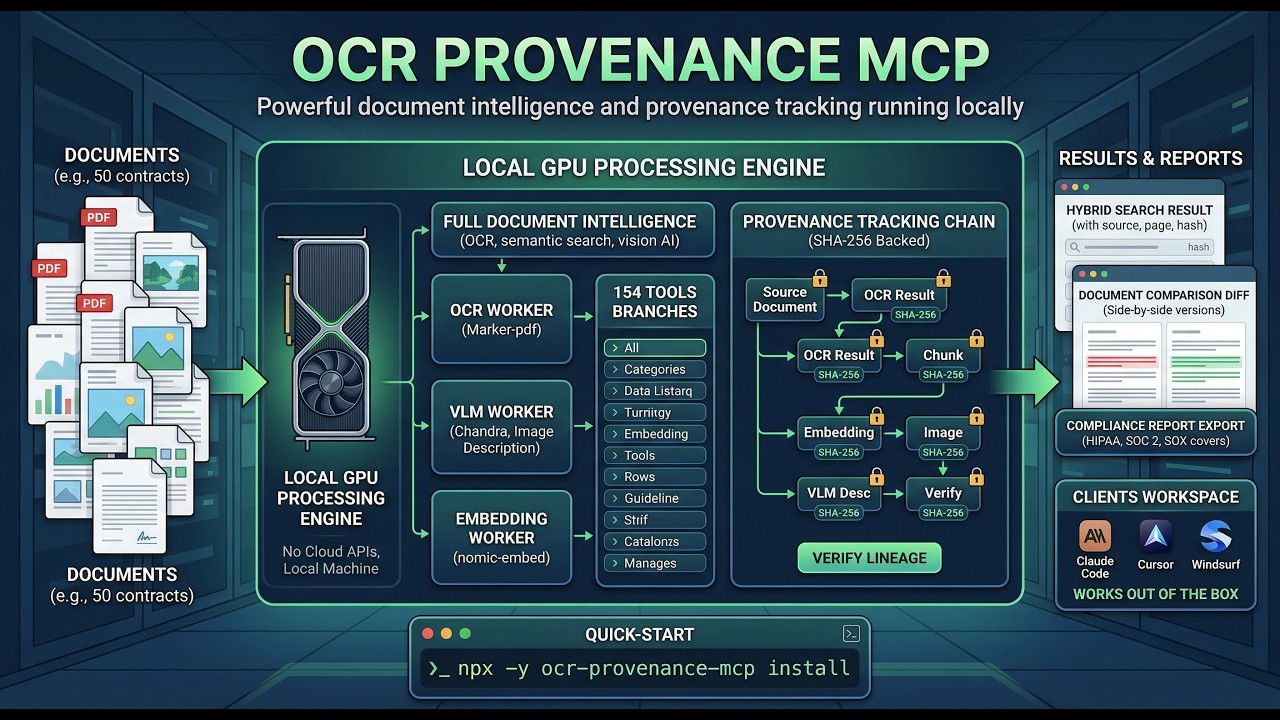
| Marker-pdf v1.10.2 | Document OCR with layout preservation | 8-10 GB |
| Chandra v0.1.8 | Vision AI -- images, charts, diagrams | ~18 GB |
| nomic-embed-text-v1.5 | 768-dim semantic embeddings | 2-3 GB |
| HDBSCAN | Auto-clustering by similarity | CPU |
| ms-marco-MiniLM-L-12-v2 | Cross-encoder reranking | ~1 GB |
DOCUMENT --> OCR_RESULT --> CHUNK --> EMBEDDING
                       --> IMAGE --> VLM_DESC --> EMBEDDING
     ^ SHA-256 hash at every node
Built for the Industries That Can't Afford a Data Breach
Healthcare
HIPAA compliance built in. Patient records processed on your hardware. Automated compliance reports. 6+ year audit trails. Consumer AI tools are explicitly prohibited for unredacted PHI -- this isn't.
Legal
Attorney-client privilege protected by architecture, not policy. Contract analysis, obligation tracking, and playbook comparison -- without exposing a single clause to the cloud. 50% of large law firms still use on-premises document management. Now they can have AI too.
Financial Services
SOC 2 and SOX compliance exports. HMAC-signed billing with tamper detection. SHA-256 provenance chains with W3C PROV export. DORA requires proof of operational resilience -- this is it.
100% local processing -- all inference on YOUR hardware
Zero telemetry -- no analytics, no tracking, no phone-home
SHA-256 provenance chains -- every extraction linked to source
Container hardening -- cap-drop=ALL, non-root, no-new-privileges
Zod schema validation on all 154 tool inputs
Models run offline -- HF_HUB_OFFLINE=1 enforced
"We don't need to guarantee your data stays private. There's no cloud to send it to. The processing happens on your GPU, in a container, on your machine. That's not a promise -- it's the architecture."
Everything You Need. Nothing You Don't.
First 100 customers who spend $100 get $10,000 credited to their account. That's 333,000+ files of processing power. Limited to the first 100.
- 153 MCP tools for complete document lifecycle$50,000/yr
- HIPAA, SOC 2, SOX compliance export suite$10,000/yr
- Contract management: obligations, playbooks, extraction$15,000/yr
- Hybrid semantic + keyword search with RAG assembly$5,000/yr
- SHA-256 cryptographic provenance chainsPriceless
- 1,150 Hormozi business strategy transcripts$997
- Approval workflows with multi-step chains$5,000/yr
- Zero telemetry, zero tracking, zero cloudPeace of mind
Your Price: $0.03 per file.
No subscription. Credits never expire.
Markdown and text files: Free. Forever.
$0.03 / file
Pay for what you use
- All 154 tools included free
- .md and .txt files process for free
- Buy credits via Stripe
- No monthly fee, no subscription
- Credits never expire
$ npx -y ocr-provenance-mcp install Enterprise
For regulated organizations
- Everything in Pay-Per-Use
- Commercial license
- Priority support
- Volume pricing
- Compliance documentation
- Custom terms
"Cloud OCR charges $0.01-0.07 per page -- and your data leaves every time. We charge $0.03 per file -- and your data never leaves. A 100-page contract costs three cents."
What You Need
Supported Formats
20 file types supported. .md and .txt files process free -- no OCR models needed, just embedding. Works great on CPU.
System Requirements
| Component | Minimum | Recommended |
|---|---|---|
| Docker | Engine 20+ | Desktop (latest) |
| Node.js | 20+ | 22+ LTS |
| RAM | 8 GB | 16+ GB |
| Disk | 30 GB | 50+ GB |
| GPU | Optional (CPU works for .md/.txt) | NVIDIA RTX 3060+ (16+ GB VRAM) |
| OS | Windows with WSL2 | Windows with WSL2 + NVIDIA GPU |
Full GPU processing (OCR + VLM + Embeddings): Windows with NVIDIA GPU. Minimum 16 GB VRAM for VLM (Chandra). Recommended: 24 GB (RTX 3090/4090).
CPU-only mode: Works on Windows for .md/.txt embedding and all search/management tools. No GPU required.
macOS: Bare metal release coming soon. The Docker container does not currently support Mac GPU passthrough.
Linux: Supported with NVIDIA GPU via Docker.
Works With Your AI Client. Automatically.
Claude Code
claude mcp add ocr-provenance-mcp -s user -- npx -y ocr-provenance-mcp Claude Desktop
Add to claude_desktop_config.json Cursor
Add to ~/.cursor/mcp.json Windsurf
Standard MCP configuration "The installer auto-detects and registers with every supported client. You probably don't need to do any of this."
Your Next Compliance Audit Is Coming. Be Ready.
Install in 60 seconds. Process your first document in 5 minutes. Generate your first compliance report in 10.
$ npx -y ocr-provenance-mcp install
Start processing documents in under 60 seconds
